
Customer API Overview
REST API for customer, address and balance management operations.
API for managing customer records, addresses, and balance operations. Supports person and company customer types with multiple address configurations per customer and location-based balance tracking.
Key areas
- Server Health: readiness checks
- Customers: search, list, create, update and delete customers
- Addresses: list, create, update, delete addresses
- Balance:
- view balance, list movements.
- perform deposits and withdrawals
- pay orders with balance
Data Model
Customer Types
Two customer types with different field sets:
Person
type Customer = {
    type: "person"
    id: string // UUID v4
    firebaseReferenceKey?: string | null
    firstName?: string | null
    lastName?: string | null
    birthDate?: Date | null // Date (ISO 8601)
    // Shared fields
    email?: string | null
    phoneNumber?: string | null // E.164 format
    comment?: string | null
}
Company
type Customer = {
    type: "company"
    id: string // UUID v4
    firebaseReferenceKey?: string | null
    companyName?: string | null
    siretCode?: string | null // SIRET CODE
    nafCode?: string | null // NAF CODE
    vatCode?: string | null // VAT CODE
    // Shared fields
    email?: string | null
    phoneNumber?: string | null // E.164 format
    comment?: string | null
}
The type field is required when creating or updating customers. Sales metrics are only returned by the GET /v1/customers/{id} endpoint and are scoped to the location specified in the backoffice-location-id header.
Addresses
Each customer can have one address per type: shipping, billing, or both.
type Address = {
    id: string  // UUID v4
    address1: string; // Primary address line
    address2: string | null | undefined; // Complementary address
    city: string; // City name
    country: string; // Country name
    zipCode: string; // Postal code
    isPrimary: boolean; // Indicates if this is the primary address for the specified type
    type: "shipping" | "billing" | "both";
    regionCode: string | null | undefined; // ISO 3166-2 code representing the administrative region (e.g., "US-CA" for California, USA)
}
Address Types
shipping- Delivery address for orders and shipmentsbilling- Address for invoicing and payment processingboth- Address used for both shipping and billing operations
Database constraint: One primary address per customer per type. The isPrimary field indicates the primary address for that type.
Customer Balance
Customers can have a balance at each location
Tab Entity
A customer's balance account at a specific location:
type Tab = {
  id: string          // UUID
  customerId: string  // Customer UUID
  locationId: string  // Location UUID
  balance: number     // Current balance in cents
  createdAt: string   // Datetime
  updatedAt: string   // Datetime
}
Each customer can have one tab per location (unique constraint on [locationId, customerId]).
Movement Entity
Single source of truth for all customer transactions.
type Movement = {
  id: string                       // UUID
  type: "deposit" | "withdrawal" | "purchase" | "refund"
  amount: number                   // Transaction amount in cents (can be positive or negative)
  description?: string             // Optional note
  totalOrder: number               // Order total at time of movement (0 for non-order movements)
  updatedBalance: number           // Balance snapshot after this movement
  tabId: string                    // Tab UUID

  // Order relationship (for purchases/refunds)
  orderId?: string                 // Order UUID (nullable, one-to-one)

  // Payment tracking (denormalized)
  paymentId?: string               // Payment method ID
  paymentName?: string             // Payment method name snapshot

  // Employee tracking (denormalized)
  employeeId?: string              // Employee who processed the movement
  employeeName?: string            // Employee name snapshot

  // Till tracking (denormalized)
  tillId?: string                  // Till/register used
  tillName?: string                // Till name snapshot

  // Currency and status
  currencyCode: string             // ISO 4217 currency code (default: "EUR")
  status: "pending" | "finalized"  // Movement status

  createdAt: string                // Datetime
  updatedAt: string                // Datetime
}
Movement Types
| Type | Amount | Order Link | Payment Info | Description |
|---|---|---|---|---|
deposit | Positive | ❌ No | ✅ Yes | Customer adds money (cash, card, transfer) |
withdrawal | Negative | ❌ No | ✅ Yes | Customer takes money out |
purchase | Negative | ✅ Yes | ❌ No | Customer pays for order from balance |
refund | Positive | ✅ Yes | ❌ No | Refund when order is cancelled |
Movement Status Lifecycle
The status field links movements to the order synchronization process for reconciliation and audit trails.
States
pending- Awaiting order sync from POS (purchases only)finalized- Order received and reconciled
Status Behavior
| Movement Type | Initial Status | Finalized When | Balance Updated |
|---|---|---|---|
deposit | finalized | Immediately | ✅ Immediately |
withdrawal | finalized | Immediately | ✅ Immediately |
purchase | pending | When orderLive is received with isPaid = true | ✅ Immediately |
refund | finalized | When orderLive is received with isCanceled = true and has at least one balance payment | ✅ Immediately |
Balance is always updated immediately when a movement is created, regardless of status. The status field tracks the administrative/reconciliation lifecycle, not the balance state.
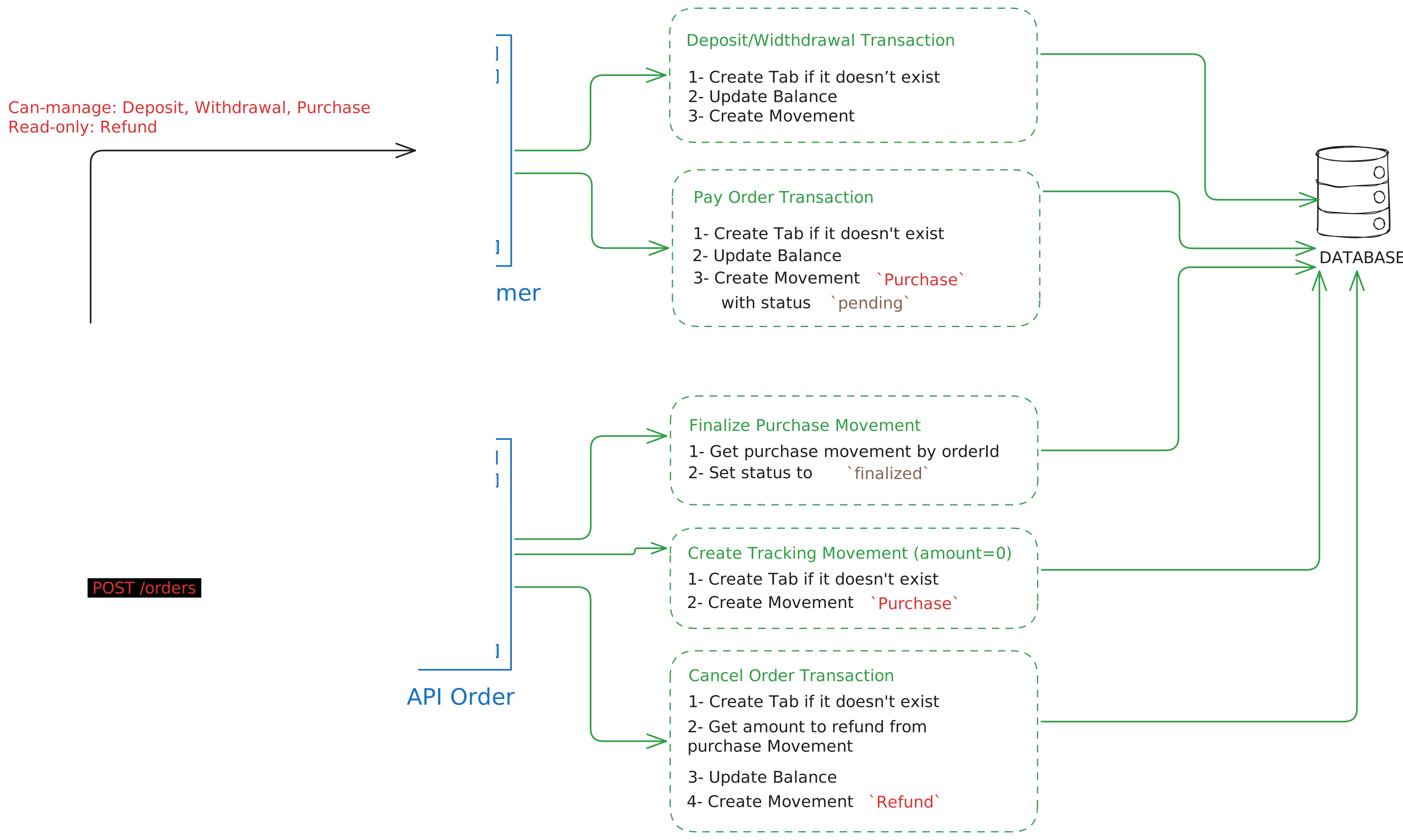
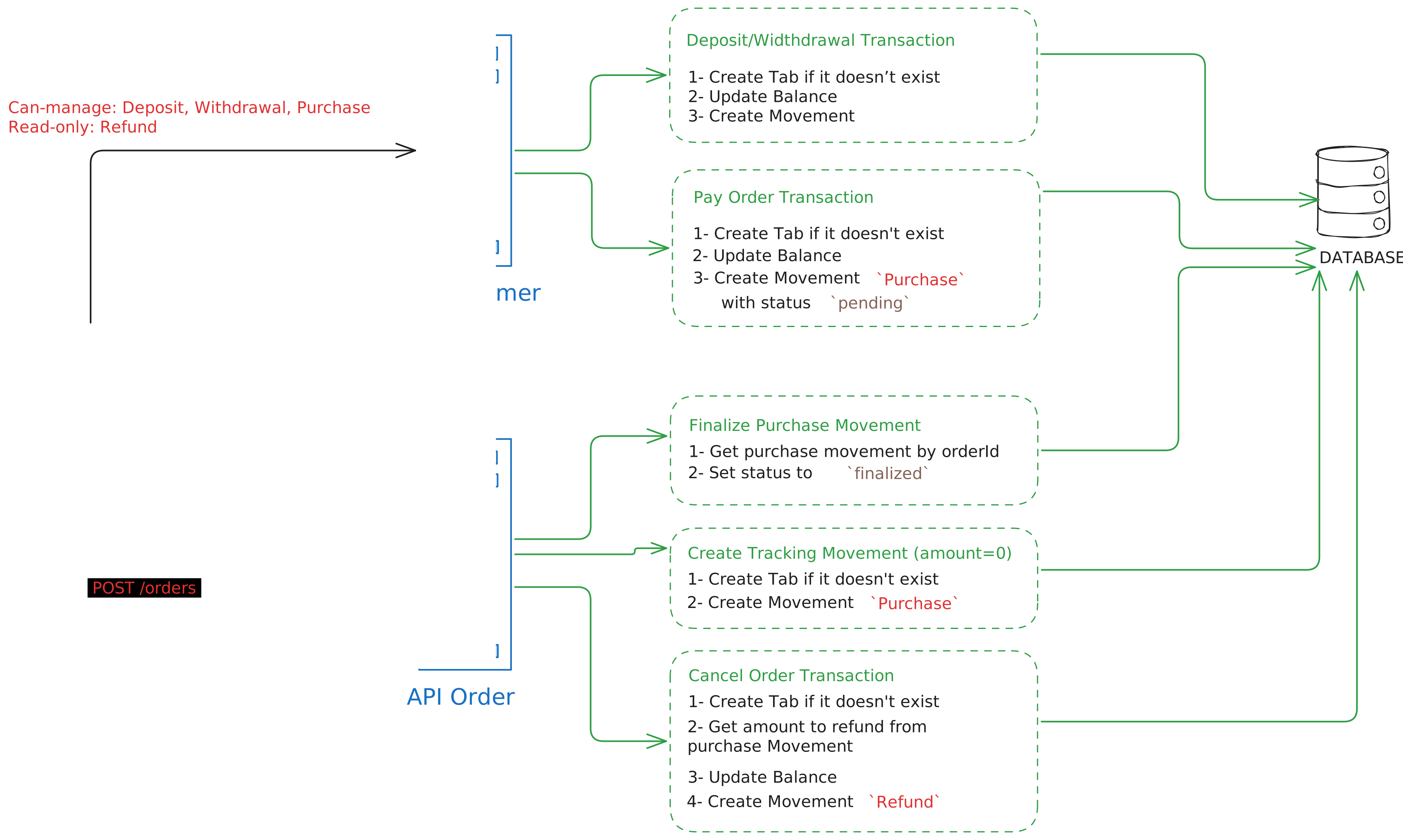
Purchase Lifecycle (Two-Phase)
Phase 1 - Payment on POS (Real-time)
- Customer pays order with balance on POS
- Movement created with
status: "pending"andorderId - Balance decremented immediately
- Order not yet sent to backend
Phase 2 - Order Live Sync (Periodic bulk)
- POS sends orders to api-order in bulk (every few seconds)
- api-order receives and saves orders
- Movements updated to
status: "finalized"
POS devices send orders periodically in bulk, not immediately. Purchase movements remain in pending state until their associated order is received by the backend.
Workflow
What Backoffice and POS Device can do
- Manage customer and address information
- List customer movements
- Create a deposit
- Create a withdrawal
What is handled by System
- Create Movements of type
purchaseandrefund - Set the status of the movement to
finalizedwhen the order is received by api-order
Endpoints
Customers
GET /v1/customers/- List customers (location-aware, includes balance)POST /v1/customers/- Create customerGET /v1/customers/{id}- Get customer (location-scoped)PUT /v1/customers/{id}- Update customerDELETE /v1/customers/{id}- Delete customer
Addresses
GET /v1/addresses/- List addressesPOST /v1/addresses/- Create addressGET /v1/addresses/{id}- Get addressPUT /v1/addresses/{id}- Update addressDELETE /v1/addresses/{id}- Delete address
Balance
GET /v1/customers/{customerId}/balance- Get customer balance at current locationGET /v1/customers/{customerId}/movements- List customer movements at current locationPOST /v1/customers/{customerId}/deposit- Create deposit (add money to balance)POST /v1/customers/{customerId}/withdrawal- Create withdrawal (remove money from balance)POST /v1/customers/{customerId}/purchase- Pay order using customer balance (creates pending movement)
Authentication
Two authentication methods are supported:
Backoffice Authentication
authorization-client: serviceKey
authorization: Bearer <serviceKey>
Include one of the following headers based on the endpoint:
backoffice-organization-id: <uuid>OR
backoffice-location-id: <uuid>Header usage by endpoint:
backoffice-organization-id: General customer operations (search, create, update, delete, addresses)backoffice-location-id: Location-specific operations (customer list with balances and balance operations)
POS Device Authentication
authorization-client: device
authorization: Bearer <deviceToken>
Error Codes
The API returns structured error responses with specific error codes for different scenarios:
{
  "message": "Error description",
  "code": "ERROR_CODE"
}
Balance Operation Errors
INSUFFICIENT_BALANCE(400) - Insufficient balance for the requested operationPAYMENT_METHOD_NOT_FOUND(404) - The specified payment method was not foundEMPLOYEE_NOT_FOUND(404) - The specified employee was not found
Customer Errors
CUSTOMER_NOT_FOUND(404) - The specified customer was not found
Address Errors
ADDRESS_NOT_FOUND(404) - The specified address was not foundADDRESS_ALREADY_EXISTS(409) - An address of this type already exists for the customer
General Errors
INVALID_LOCATION_ID(400) - The provided location ID is invalidINVALID_ORGANIZATION_ID(400) - The provided organization ID is invalidLOCATION_NOT_FOUND(404) - The specified location was not foundORGANIZATION_NOT_FOUND(404) - The specified organization was not foundAPI_CUSTOMER_ERROR(500) - An unexpected error occurred in the customer API